ARDUINO
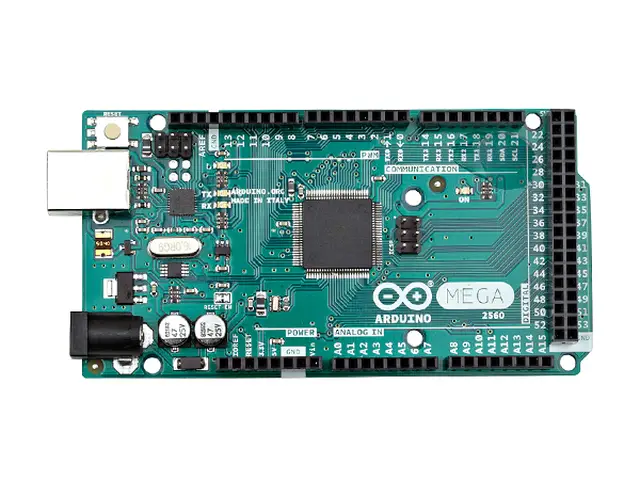
Arduino Mega2560 Rev3
Arduino MEGA 2560
59,99 €
Inkl. MwSt., zzgl. VersandkostenAuf Lager
Versandfertig am nächsten WerktagThe Arduino Mega is UNO’s big sister. Ready for your larger projects
The Arduino Mega has plenty of pins for your complex projects like 3D printers and robotics. If you started with an UNO and need more pins, the Mega is for you.
Overview
The Arduino Mega 2560 is a microcontroller board based on the ATmega2560 (datasheet). It has 54 digital input/output pins (of which 15 can be used as PWM outputs), 16 analog inputs, 4 UARTs (hardware serial ports), a 16 MHz crystal oscillator, a USB connection, a power jack, an ICSP header, and a reset button. It contains everything needed to support the microcontroller; simply connect it to a computer with a USB cable or power it with a AC-to-DC adapter or battery to get started. The Mega is compatible with most shields designed for the Arduino Duemilanove or Diecimila.
The Mega 2560 is an update to the Arduino Mega, which it replaces.
The Mega2560 differs from all preceding boards in that it does not use the FTDI USB-to-serial driver chip. Instead, it features the ATmega16U2 (ATmega8U2 in the revision 1 and revision 2 boards) programmed as a USB-to-serial converter.
Revision 2 of the Mega2560 board has a resistor pulling the 8U2 HWB line to ground, making it easier to put into DFU mode.
Revision 3 of the board has the following new features:
- 1.0 pinout: added SDA and SCL pins that are near to the AREF pin and two other new pins placed near to the RESET pin, the IOREF that allow the shields to adapt to the voltage provided from the board. In future, shields will be compatible both with the board that use the AVR, which operate with 5V and with the Arduino Due that operate with 3.3V. The second one is a not connected pin, that is reserved for future purposes.
- Stronger RESET circuit.
- Atmega 16U2 replace the 8U2.
| Arduino Microcontroller | |
|---|---|
Microcontroller | ATmega2560 |
Architecture | AVR |
Operating Voltage | 5 V |
Flash memory | 256 KB of which 8 KB used by bootloader |
SRAM | 8 KB |
Clock Speed | 16 MHz |
Analog I/O Pins | 16 |
EEPROM | 4 KB |
DC Current per I/O Pins | 40 mA (I/O Pins) |
| General | |
|---|---|
Input Voltage | 5-12 V |
Digital I/O Pins | 54 (of which 15 provide PWM output and 4 UART) |
PWM Output | 15 |
Power Consumption | 38 mA |
PCB Size | 53.3 x 101.5 mm |
Weight | 36 g |
Product Code | A000067 |
Technical Specifics
Power
The Arduino Mega can be powered via the USB connection or with an external power supply. The power source is selected automatically.
External (non-USB) power can come either from an AC-to-DC adapter (wall-wart) or battery. The adapter can be connected by plugging a 2.1mm center-positive plug into the board's power jack. Leads from a battery can be inserted in the Gnd and Vin pin headers of the POWER connector.
The board can operate on an external supply of 6 to 15 volts. If supplied with less than 7V, however, the 5V pin may supply less than five volts and the board may be unstable. If using more than 12V, the voltage regulator may overheat and damage the board. The recommended range is 7 to 12 volts.
The power pins are as follows:
- VIN. The input voltage to the Arduino board when it's using an external power source (as opposed to 5 volts from the USB connection or other regulated power source). You can supply voltage through this pin, or, if supplying voltage via the power jack, access it through this pin.
- 5V. This pin outputs a regulated 5V from the regulator on the board. The board can be supplied with power either from the DC power jack (7 - 12V), the USB connector (5V), or the VIN pin of the board (7-12V). Supplying voltage via the 5V or 3.3V pins bypasses the regulator, and can damage your board. We don't advise it.
- 3V3. A 3.3 volt supply generated by the on-board regulator. Maximum current draw is 50 mA.
- GND. Ground pins.
- IOREF. This pin on the Arduino board provides the voltage reference with which the microcontroller operates. A properly configured shield can read the IOREF pin voltage and select the appropriate power source or enable voltage translators on the outputs for working with the 5V or 3.3V.
Memory
The ATmega2560 has 256 KB of flash memory for storing code (of which 8 KB is used for the bootloader), 8 KB of SRAM and 4 KB of EEPROM (which can be read and written with the EEPROM library).
Input and Output
Each of the 54 digital pins on the Mega can be used as an input or output, using pinMode(), digitalWrite(), and digitalRead() functions. They operate at 5 volts. Each pin can provide or receive a maximum of 40 mA and has an internal pull-up resistor (disconnected by default) of 20-50 kOhms. In addition, some pins have specialized functions:
- Serial 0: (RX) and 1 (TX);
- Serial 1: 19 (RX) and 18 (TX);
- Serial 2: 17 (RX) and 16 (TX);
- Serial 3: 15 (RX) and 14 (TX). Used to receive (RX) and transmit (TX) TTL serial data. Pins 0 and 1 are also connected to the corresponding pins of the ATmega16U2 USB-to-TTL Serial chip.
- External Interrupts: 2 (interrupt 0), 3 (interrupt 1), 18 (interrupt 5), 19 (interrupt 4), 20 (interrupt 3), and 21 (interrupt 2). These pins can be configured to trigger an interrupt on a low value, a rising or falling edge, or a change in value. See the attachInterrupt() function for details.
- PWM: 2 to 13 and 44 to 46. Provide 8-bit PWM output with the analogWrite()function.
- SPI: 50 (MISO), 51 (MOSI), 52 (SCK), 53 (SS). These pins support SPI communication using the SPI library. The SPI pins are also broken out on the ICSP header, which is physically compatible with the Uno, Duemilanove and Diecimila.
- LED: 13. There is a built-in LED connected to digital pin 13. When the pin is HIGH value, the LED is on, when the pin is LOW, it's off.
- TWI: 20 (SDA) and 21 (SCL). Support TWI communication using the Wire library. Note that these pins are not in the same location as the TWI pins on the Duemilanove or Diecimila.
The Mega2560 has 16 analog inputs, each of which provide 10 bits of resolution (i.e. 1024 different values). By default they measure from ground to 5 volts, though is it possible to change the upper end of their range using the AREF pin and analogReference() function.
There are a couple of other pins on the board:
- AREF. Reference voltage for the analog inputs. Used with analogReference().
- Reset. Bring this line LOW to reset the microcontroller. Typically used to add a reset button to shields which block the one on the board.
Communication
The Arduino Mega2560 has a number of facilities for communicating with a computer, another Arduino, or other microcontrollers. The ATmega2560 provides four hardware UARTs for TTL (5V) serial communication. An ATmega16U2 (ATmega 8U2 on the revision 1 and revision 2 boards) on the board channels one of these over USB and provides a virtual com port to software on the computer (Windows machines will need a .inf file, but OSX and Linux machines will recognize the board as a COM port automatically. The Arduino software includes a serial monitor which allows simple textual data to be sent to and from the board. The RX and TX LEDs on the board will flash when data is being transmitted via the ATmega8U2/ATmega16U2 chip and USB connection to the computer (but not for serial communication on pins 0 and 1).
A SoftwareSerial library allows for serial communication on any of the Mega2560's digital pins.
The ATmega2560 also supports TWI and SPI communication. The Arduino software includes a Wire library to simplify use of the TWI bus; For SPI communication, use the SPI library.
Programming
The Arduino Mega can be programmed with the Arduino software.
The ATmega2560 on the Arduino Mega comes preburned with a bootloader that allows you to upload new code to it without the use of an external hardware programmer. It communicates using the original STK500 protocol.
You can also bypass the bootloader and program the microcontroller through the ICSP (In-Circuit Serial Programming) header using Arduino ISP or similar;
The ATmega16U2 (or 8U2 in the rev1 and rev2 boards) firmware source code is available in the Arduino repository. The ATmega16U2/8U2 is loaded with a DFU bootloader, which can be activated by:
- On Rev1 boards: connecting the solder jumper on the back of the board (near the map of Italy) and then resetting the 8U2.
- On Rev2 or later boards: there is a resistor that pulling the 8U2/16U2 HWB line to ground, making it easier to put into DFU mode. You can then use Atmel's FLIP software (Windows) or the DFU programmer (Mac OS X and Linux) to load a new firmware. Or you can use the ISP header with an external programmer (overwriting the DFU bootloader).
Automatic (Software) Reset
Rather then requiring a physical press of the reset button before an upload, the Arduino Mega2560 is designed in a way that allows it to be reset by software running on a connected computer. One of the hardware flow control lines (DTR) of the ATmega8U2 is connected to the reset line of the ATmega2560 via a 100 nanofarad capacitor. When this line is asserted (taken low), the reset line drops long enough to reset the chip. The Arduino software uses this capability to allow you to upload code by simply pressing the upload button in the Arduino environment. This means that the bootloader can have a shorter timeout, as the lowering of DTR can be well-coordinated with the start of the upload.
This setup has other implications. When the Mega2560 is connected to either a computer running Mac OS X or Linux, it resets each time a connection is made to it from software (via USB). For the following half-second or so, the bootloader is running on the Mega2560. While it is programmed to ignore malformed data (i.e. anything besides an upload of new code), it will intercept the first few bytes of data sent to the board after a connection is opened. If a sketch running on the board receives one-time configuration or other data when it first starts, make sure that the software with which it communicates waits a second after opening the connection and before sending this data.
The Mega2560 contains a trace that can be cut to disable the auto-reset. The pads on either side of the trace can be soldered together to re-enable it. It's labeled "RESET-EN". You may also be able to disable the auto-reset by connecting a 110 ohm resistor from 5V to the reset line.
USB Overcurrent Protection
The Arduino Mega2560 has a resettable polyfuse that protects your computer's USB ports from shorts and overcurrent. Although most computers provide their own internal protection, the fuse provides an extra layer of protection. If more than 500 mA is applied to the USB port, the fuse will automatically break the connection until the short or overload is removed.
Physical Characteristics
The maximum length and width of the Mega2560 PCB are 4 and 2.1 inches respectively, with the USB connector and power jack extending beyond the former dimension. Three screw holes allow the board to be attached to a surface or case. Note that the distance between digital pins 7 and 8 is 160 mil (0.16"), not an even multiple of the 100 mil spacing of the other pins.
The Mega2560 is designed to be compatible with most shields designed for the Uno, Diecimila or Duemilanove. Digital pins 0 to 13 (and the adjacent AREF and GND pins), analog inputs 0 to 5, the power header, and ICSP header are all in equivalent locations. Further the main UART (serial port) is located on the same pins (0 and 1), as are external interrupts 0 and 1 (pins 2 and 3 respectively). SPI is available through the ICSP header on both the Mega2560 and Duemilanove / Diecimila. Please note that I2C is not located on the same pins on the Mega (20 and 21) as the Duemilanove / Diecimila (analog inputs 4 and 5).
| Artikelnummer | 159437 |
| Hersteller | ARDUINO |
| Herstellernummer | A000067 |
| EAN | 8058333490083 |
ARDUINO
Arduino Mega2560 Rev3
Arduino MEGA 2560
59,99 €
Inkl. MwSt., zzgl. VersandkostenAuf Lager
Versandfertig am nächsten Werktag| Artikelnummer | 159437 |
| Hersteller | ARDUINO |
| Herstellernummer | A000067 |
| EAN | 8058333490083 |
Warum bei LToys kaufen
100% Originalware
Alle Artikel sind originalverpackte Markenware – keine Fälschungen, keine Graumarkt-Importe.
Schneller, versicherter Versand
Sorgfältig verpackt und versichert verschickt – aus Luxemburg in die ganze Welt.
Persönliche Fachberatung
Echte Sammler und Fans beraten Sie – per E-Mail, Telefon oder direkt im Laden.
Treuepunkte bei jedem Einkauf
Mit der LToys Kundenkarte sammeln Sie bei jeder Bestellung Punkte.
Sie haben Frage zu einem unserer Produkte? Sie sind auf der Suche nach einem seltenen Set?
Unser Expertenteam hilft Ihnen gerne weiter!
Persönliche Kundenkarte
Mit der Kundenkarte sammeln Sie bei jedem Kauf in unserem Laden oder in unserem Online-Shop Punkte im Wert von 5% Ihres Einkaufes.
Kostenloser Versand
Für Bestellungen mit einem Bestellwert von 100 € und mehr ist der Standardversand in viele Länder der EU kostenlos.
Click & Collect
Bestellen Sie bequem online und holen Sie Ihre Ware selbst in unserem Geschäft ab. Sie werden informiert, sobald die Bestellung bereitliegt.
Abonnieren Sie unseren E-Mail-Newsletter!
Erhalten Sie Informationen zu Produktneuheiten, Angeboten und Aktionen direkt und bequem in Ihr Posteingang.
- Über Uns
- Support
- Preishinweis
Alle Preise inklusive der gesetzlichen Mehrwertsteuer. Die durchgestrichenen Preise entsprechen dem bisherigen LToys-Preis.
- Sicher einkaufen
Alle Daten die während Ihres Besuches auf ltoys.lu entstehen werden SSL-verschlüsselt übertragen.
Bei uns zahlen Sie sicher und bequem. Egal ob online über einen Zahlungsdienstleister oder klassisch per Überweisung.
- Partner & mehr


Wir verwenden Cookies und ähnliche Technologien, um Inhalte zu personalisieren und Ihr Erlebnis zu verbessern. Außerdem nutzen sie um grundlegende Webseitenfunktionen anzubieten und zu verstehen wie Kunden unsere Webseite nutzen und mit diesen Daten die die Webseite zu optimieren.
Um fortzufahren, wählen Sie bitte ein der beiden Optionen aus. Sie können Ihre getätigten Einstellung jederzeit anpassen.
Mit welchen Cookie-Einstellungen möchten Sie fortfahren?