PIMORONI LTD
Picade Console
97,10 €
Inkl. MwSt., zzgl. VersandkostenNicht auf Lager
Liefertermin auf AnfragePower-up your TV with Picade Console! It's a compact, Raspberry Pi-powered retro games machine with authentic arcade controls that plugs right into your TV, monitor, or other HDMI display.
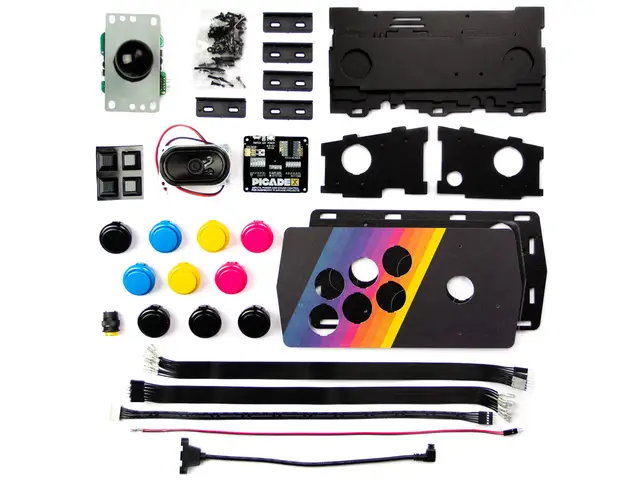
Picade Console is fight stick-style arcade console that riffs off our larger Picade with the same retro feel, same joystick and buttons, dedicated power button, and driven by the same powerful combo of the Raspberry Pi and Picade X HAT USB-C. It's beautifully packaged, comes with stickers and a neon-infused A3 Picade Console poster, and full assembly instructions.
It comes in kit form and takes an hour or two to build. The enclosure is made from powder-coated MDF and acrylic, giving it an authentic arcade look and feel. All you'll need to add is a Raspberry Pi, USB-C power supply, HDMI cable, and micro-SD card.
*TV not included! Using a CRT TV requires additional adaptors.
Features
- Compatible with Raspberry Pi 4
- Black, powder-coated panels
- Acrylic console with retro artwork
- Push-fit arcade buttons
- Joystick with black ball top
- Speaker (3W, 4Ω, 2.5" driver)
- Easy access with removable back panel
- Dedicated illuminated power button
- Grippy rubber feet
- Dimensions (assembled): 245x120x140mm
Picade X HAT USB-C features
- Easy DuPont connectors for buttons and joystick
- Push-fit speaker terminals
- I2S audio DAC with 3W amplifier (mono)
- USB-C powered
- Power management, power switch pins, and power button
- Dedicated Picade Plasma Button connector
- 4-way joystick inputs
- 6 player buttons
- 4 utility buttons
- Metal standoffs to hold your Picade X HAT USB-C securely
Extras
- Picade Console poster / assembly instructions
- Picade stickers
Compact retro gaming
Picade Console is more compact and easier to build, but has a bunch of features liked a dedicated power button, better cable routing out the back of the console with a panel-mount USB-C connector for power, and retro-themed artwork.
Picade X HAT USB-C is packed full of useful features. We use simple DuPont connectors that just push in rather than fiddly screw terminals, and the speaker terminals are easy push-fit connectors.
There's dedicated power management on-board Picade X HAT USB-C; just plug your USB-C power supply into the back of Picade Console and it'll power your Pi through the Picade X HAT USB-C. The power button connected to the HAT means that once your Pi is safely shutdown, the power will be cut completely to the Pi. A simple press of the power button will boot your Picade Console up again.
Software setup
We recommend the RetroPie operating system for your Picade. You can download it from the RetroPie website and then burn it to a micro-SD card with Etcher.
Connect a USB keyboard to your Pi, and connect to Wi-Fi in the RetroPie menu. Press F4 to exit to the terminal and then type curl https://get.pimoroni.com/picadehat | bash to run the Picade HAT installer.
Reboot your Pi, if it doesn't prompt you to. Press the "Alt" key on your keyboard and then select "Configure input" to configure your Picade Console's controls. You'll find that the sound and power button should both be working now too!
| Artikelnummer | 185326 |
| Hersteller | PIMORONI LTD |
| Herstellernummer | PIM488 |
| EAN | 606034880832 |
PIMORONI LTD
Picade Console
97,10 €
Inkl. MwSt., zzgl. VersandkostenNicht auf Lager
Liefertermin auf Anfrage| Artikelnummer | 185326 |
| Hersteller | PIMORONI LTD |
| Herstellernummer | PIM488 |
| EAN | 606034880832 |
Sie haben Frage zu einem unserer Produkte? Sie sind auf der Suche nach einem seltenen Set?
Unser Expertenteam hilft Ihnen gerne weiter!
Persönliche Kundenkarte
Mit der Kundenkarte sammeln Sie bei jedem Kauf in unserem Laden oder in unserem Online-Shop Punkte im Wert von 5% Ihres Einkaufes.
Kostenloser Versand
Für Bestellungen mit einem Bestellwert von 100 € und mehr ist der Standardversand in viele Länder der EU kostenlos.
Click & Collect
Bestellen Sie bequem online und holen Sie Ihre Ware selbst in unserem Geschäft ab. Sie werden informiert, sobald die Bestellung bereitliegt.
Abonnieren Sie unseren E-Mail-Newsletter!
Erhalten Sie Informationen zu Produktneuheiten, Angeboten und Aktionen direkt und bequem in Ihr Posteingang.
Blättern Sie durch den aktuellen LEGO® Katalog
Entdecken Sie die Welt von LEGO® mit dem interaktiven Katalog! Der Katalog liegt in deutschen Sprache vor.


- Über Uns
- Support
- Preishinweis
Alle Preise inklusive der gesetzlichen Mehrwertsteuer. Die durchgestrichenen Preise entsprechen dem bisherigen LToys-Preis.
- Sicher einkaufen
Alle Daten die während Ihres Besuches auf ltoys.lu entstehen werden SSL-verschlüsselt übertragen.
Bei uns zahlen Sie sicher und bequem. Egal ob online über einen Zahlungsdienstleister oder klassisch per Überweisung.
- Partner & mehr


Wir verwenden Cookies und ähnliche Technologien, um Inhalte zu personalisieren und Ihr Erlebnis zu verbessern. Außerdem nutzen sie um grundlegende Webseitenfunktionen anzubieten und zu verstehen wie Kunden unsere Webseite nutzen und mit diesen Daten die die Webseite zu optimieren.
Um fortzufahren, wählen Sie bitte ein der beiden Optionen aus. Sie können Ihre getätigten Einstellung jederzeit anpassen.
Mit welchen Cookie-Einstellungen möchten Sie fortfahren?