ARDUINO
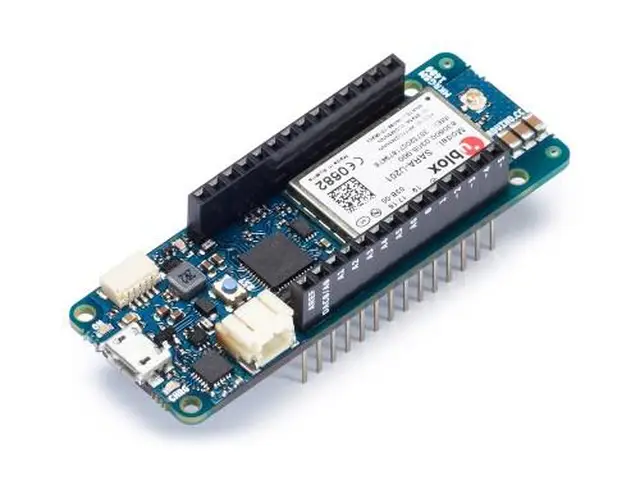
Arduino MKR GSM 1400 w/o Antenna
74,40 €
Including VAT, plus shipping costsNot in stock
Delivery time on requestArduino MKR GSM 1400 has been designed to offer a practical and cost effective solution for makers seeking to add global GSM connectivity to their projects with minimal previous experience in networking. It is based on the Atmel SAMD21 and a SARAU201 GSM module.
The design includes the ability to power the board using a LiPo battery or external power source from 5V up to 12V. Switching from one source to the other is done automatically. A good 32 bit computational power similar to the Zero board, the usual rich set of I/O interfaces, gobal GSM communication and the ease of use of the Arduino Software (IDE) for code development and programming. All these features make this board the preferred choice for the emerging IoT battery-powered projects in a compact form factor. The USB port can be used to supply power (5V) to the board. During cellular transmissions the peak current required by the board will exceed 500mA. This is in excess of what can sourced by a standard USB port, so it is MANDATORY to have a 1500 mAh or higher LiPo battery plugged all the time, the current provided by the USB port will be supplmented by the battery. When powering the board using Vin, a 5V power supply that can supply atleast 2A is required..
Warning: Unlike most Arduino & Genuino boards, the MKR GSM 1400 runs at 3.3V. The maximum voltage that the I/O pins can tolerate is 3.3V. Applying voltages higher than 3.3V to any I/O pin could damage the board. While output to 5V digital devices is possible, bidirectional communication with 5V devices needs proper level shifting.
You can find here your board warranty informations.
Getting Started
You can find in the Getting Started section all the information you need to configure your board, use the Arduino Software (IDE), and start tinker with coding and electronics.
Need Help?
- On the Software on the Arduino Forum
- On Projects on the Arduino Forum
- On the Product itself through our Customer Support
Tech Specs
| Microcontroller | SAMD21 Cortex-M0+ 32bit low power ARM MCU |
| Board Power Supply (USB/VIN) | 5V/5-12V |
| Supported Battery(*) | 3.7V LiPo |
| Circuit Operating Voltage | 3.3V |
| Digital I/O Pins | 8 |
| PWM Pins | 12 (0, 1, 2, 3, 4, 5, 6, 7, 8, 10, A3 - or 18 -, A4 -or 19) |
| UART | 1 |
| SPI | 1 |
| I2C | 1 |
| Analog Input Pins | 7 (ADC 8/10/12 bit) |
| Analog Output Pins | 1 (DAC 10 bit) |
| External Interrupts | 8 (0, 1, 4, 5, 6, 7, 8, A1 -or 16-, A2 - or 17) |
| DC Current per I/O Pin | 7 mA |
| Flash Memory | 256 KB |
| SRAM | 32 KB |
| EEPROM | no |
| Clock Speed | 32.768 kHz (RTC), 48 MHz |
| LED_BUILTIN | 6 |
| Full-Speed USB Device and embedded Host | |
| Antenna power | 2dB |
| Carrier frequency | 433/868/915 MHz |
| Working region | Global |
| Length | 67.64 mm |
| Width | 25 mm |
| Weight | 32 gr. |
Documentation
OSH: Schematics
The MKR GSM 1400 is open-source hardware! You can build your own board using the following files:
Pinout
Download the pinout in PNG format
Antenna
The MKR GSM 1400 has to be used with a GSM antenna that can be attached to the board with the micro UFL connector. Please check that it can accept frequencies in the GSM's range (880/915 MHz).
Please note: for best result, do not attach the antenna to a metallic surface like car chassis, etc.
Batteries, Pins and board LEDs
Battery capacity: The connected battery must be a 3.7V LiPo
- Vin: This pin can be used to power the board with a regulated voltage source ranging from 5V to 12V. If the power is fed through this pin, the USB power source is disconnected. This is the only way you can supply 5v (range is 5V to maximum 6V) to the board not using USB. This pin is an INPUT.
- 5V: This pin outputs 5V from the the board when powered from the USB connector or from the VIN pin of the board. It is unregulated and the voltage is taken directly from the inputs.
- VCC: This pin outputs 3.3V through the on-board voltage regulator. This voltage is 3.3V if USB or VIN is used and equal to the series of the two batteries when they are used
- LED ON: This LED is connected to the input voltage source from either USB or VIN. It is also connected to the battery power. This means that it is ON (with a lower intensity) also when the battery is inserted.
- Onboard LED: On MKR GSM 1400 the on board LED is connected to D6 and not D13 as on the other boards. Blink example or other sketcthes that uses pin 13 for on board LED may need to be changed to work properly.
| Article number | 169028 |
| Manufacturer | ARDUINO |
| Manufacturer Part Number | ABX00018 |
| EAN | 813747020565 |
ARDUINO
Arduino MKR GSM 1400 w/o Antenna
74,40 €
Including VAT, plus shipping costsNot in stock
Delivery time on request| Article number | 169028 |
| Manufacturer | ARDUINO |
| Manufacturer Part Number | ABX00018 |
| EAN | 813747020565 |
Why Shop at LToys
100% Authentic Products
Every item is genuine, brand-new and officially sourced — no counterfeits, no grey-market imports.
Fast, Insured Shipping
Carefully packed and fully insured — shipped from Luxembourg worldwide.
Expert Personal Support
Real collectors and enthusiasts are here to help — by email, phone or in our store.
Loyalty Rewards on Every Order
Collect points with every purchase through the LToys customer card.
You have a question regarding one of our products? You are searching for a rare set?
Our team of experts will be happy to help you!
Customer Card
With the customer card you collect points worth 5% of your purchase with every transaction in our shop or in our online shop.
Free Shipping
For orders with a value of 100 € and more, standard shipping to many EU countries is free of charge.
Click & Collect
Place your order conveniently online and collect your goods in our shop yourself. You will be informed as soon as the order is ready.
Subscribe to our e-mail newsletter!
Conveniently receive information on new products, offers and promotions directly to your inbox.
- About Us
- Support
- Pricing information
All prices incl. VAT. Crossed-out prices correspond to the previous LToys price.
- Secure shopping
All data generated during your visit on ltoys.lu is transmitted SSL-encrypted.
You can pay securely and conveniently at our shop. Whether online via a payment service provider or by bank transfer.
- Partners & More


We use cookies and similar technologies to personalise content and improve your experience. They are also used to provide basic website functionality and to understand how customers use our website and to use this information to improve the website.
To continue, please select one of the two options. You can adjust your settings at any time.
With which cookie settings do you want to proceed?