PIMORONI LTD
Picade Console
97,10 €
Including VAT, plus shipping costsNot in stock
Delivery time on requestPower-up your TV with Picade Console! It's a compact, Raspberry Pi-powered retro games machine with authentic arcade controls that plugs right into your TV, monitor, or other HDMI display.
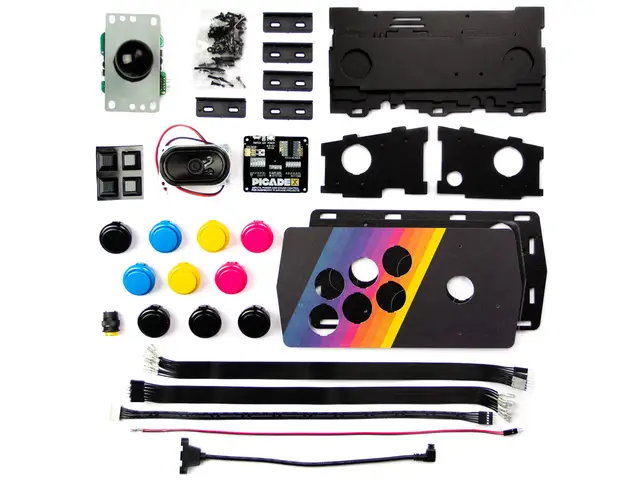
Picade Console is fight stick-style arcade console that riffs off our larger Picade with the same retro feel, same joystick and buttons, dedicated power button, and driven by the same powerful combo of the Raspberry Pi and Picade X HAT USB-C. It's beautifully packaged, comes with stickers and a neon-infused A3 Picade Console poster, and full assembly instructions.
It comes in kit form and takes an hour or two to build. The enclosure is made from powder-coated MDF and acrylic, giving it an authentic arcade look and feel. All you'll need to add is a Raspberry Pi, USB-C power supply, HDMI cable, and micro-SD card.
*TV not included! Using a CRT TV requires additional adaptors.
Features
- Compatible with Raspberry Pi 4
- Black, powder-coated panels
- Acrylic console with retro artwork
- Push-fit arcade buttons
- Joystick with black ball top
- Speaker (3W, 4Ω, 2.5" driver)
- Easy access with removable back panel
- Dedicated illuminated power button
- Grippy rubber feet
- Dimensions (assembled): 245x120x140mm
Picade X HAT USB-C features
- Easy DuPont connectors for buttons and joystick
- Push-fit speaker terminals
- I2S audio DAC with 3W amplifier (mono)
- USB-C powered
- Power management, power switch pins, and power button
- Dedicated Picade Plasma Button connector
- 4-way joystick inputs
- 6 player buttons
- 4 utility buttons
- Metal standoffs to hold your Picade X HAT USB-C securely
Extras
- Picade Console poster / assembly instructions
- Picade stickers
Compact retro gaming
Picade Console is more compact and easier to build, but has a bunch of features liked a dedicated power button, better cable routing out the back of the console with a panel-mount USB-C connector for power, and retro-themed artwork.
Picade X HAT USB-C is packed full of useful features. We use simple DuPont connectors that just push in rather than fiddly screw terminals, and the speaker terminals are easy push-fit connectors.
There's dedicated power management on-board Picade X HAT USB-C; just plug your USB-C power supply into the back of Picade Console and it'll power your Pi through the Picade X HAT USB-C. The power button connected to the HAT means that once your Pi is safely shutdown, the power will be cut completely to the Pi. A simple press of the power button will boot your Picade Console up again.
Software setup
We recommend the RetroPie operating system for your Picade. You can download it from the RetroPie website and then burn it to a micro-SD card with Etcher.
Connect a USB keyboard to your Pi, and connect to Wi-Fi in the RetroPie menu. Press F4 to exit to the terminal and then type curl https://get.pimoroni.com/picadehat | bash to run the Picade HAT installer.
Reboot your Pi, if it doesn't prompt you to. Press the "Alt" key on your keyboard and then select "Configure input" to configure your Picade Console's controls. You'll find that the sound and power button should both be working now too!
| Article number | 185326 |
| Manufacturer | PIMORONI LTD |
| Manufacturer Part Number | PIM488 |
| EAN | 606034880832 |
PIMORONI LTD
Picade Console
97,10 €
Including VAT, plus shipping costsNot in stock
Delivery time on request| Article number | 185326 |
| Manufacturer | PIMORONI LTD |
| Manufacturer Part Number | PIM488 |
| EAN | 606034880832 |
You have a question regarding one of our products? You are searching for a rare set?
Our team of experts will be happy to help you!
Customer Card
With the customer card you collect points worth 5% of your purchase with every transaction in our shop or in our online shop.
Free Shipping
For orders with a value of 100 € and more, standard shipping to many EU countries is free of charge.
Click & Collect
Place your order conveniently online and collect your goods in our shop yourself. You will be informed as soon as the order is ready.


- About Us
- Support
- Pricing information
All prices incl. VAT. Crossed-out prices correspond to the previous LToys price.
- Secure shopping
All data generated during your visit on ltoys.lu is transmitted SSL-encrypted.
You can pay securely and conveniently at our shop. Whether online via a payment service provider or by bank transfer.
- Partners & More


We use cookies and similar technologies to personalise content and improve your experience. They are also used to provide basic website functionality and to understand how customers use our website and to use this information to improve the website.
To continue, please select one of the two options. You can adjust your settings at any time.
With which cookie settings do you want to proceed?