PIMORONI LTD
Picade - 10-inch display
220,60 €
TVA comprise, plus frais d'expéditionEn stock
Prêt pour l'expédition le jour ouvrable suivantThe ultimate desktop retro arcade machine! Picade is a Raspberry Pi-powered mini arcade that you build yourself, with authentic arcade controls, a high resolution 4:3 display that's ideal for retro gaming, and a punchy speaker to hear those 8-bit game soundtracks at their best
The all-new Picade has been completely redesigned, from the inside out! There's new artwork, a new display and display driver board, dedicated power button, an all-new Picade X HAT, easier wiring, easier access to the interior of the cabinet, beautiful new packaging, a bunch of extra goodies (stickers and an enamel Picade pin), and a gorgeous Picade poster and assembly instructions.
Picade comes in kit form, and it'll take around two to three hours to build. The cabinet is made from powder-coated MDF, giving it a quality look and feel similar to a full-size arcade. All you'll need to add is a Raspberry Pi, power supply, and micro-SD card.
You can watch our Picade ad below!
Cabinet features
- Black, powder-coated panels
- Acrylic marquee and console with authentic artwork
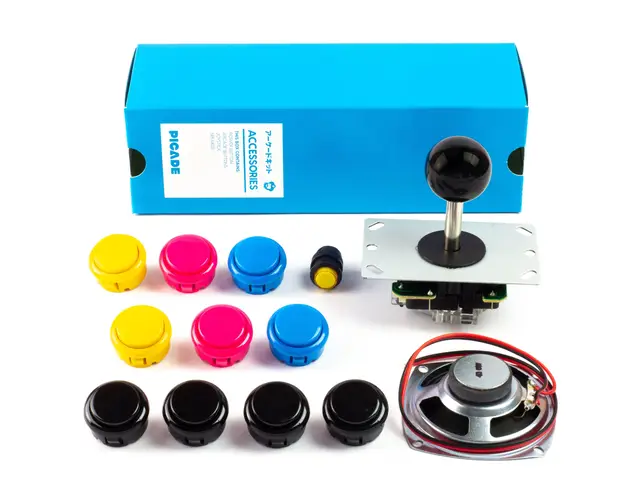
- Push-fit arcade buttons
- Joystick with black ball top
- 3" speaker (5W, 4Ω)
- Easy access with removable back panel
- Dedicated illuminated power button
- Grippy rubber feet
- Dimensions: 350x230x210mm
10-inch display features
- 1024x768 (4:3 ratio) IPS (wide viewing angle) display
- Pimoroni-designed and manufactured HDMI display driver board and keypad controls
- Powered by micro-USB cable (included) from your Pi
Picade X HAT features
- Easy DuPont connectors for buttons and joystick
- Push-fit speaker terminals
- I2S audio DAC with 3W amplifier (mono)
- Power management, power switch pins, and power button
- 4-way joystick inputs
- 6 player buttons
- 4 utility buttons
- Metal standoffs to hold your Picade X HAT securely
Extras
- Picade enamel pin badge
- Pimoroni Super Sticker Selection
- Picade poster / assembly instructions
What's new!?
The cabinet is more compact, so it fits more neatly on your desk, but has a higher resolution 10" display (1024x768). The display is driven by a new Pimoroni-designed and manufactured driver board, with keypad controls. It's an IPS panel, so it looks great from any viewing angle!
The all-new Picade X HAT is packed full of useful features. We've moved from more fiddly screw terminals to simple DuPont connectors that just push in, and the speaker terminals are the same easy push-fit connectors that we use on pHAT BEAT.
There's dedicated power management on-board Picade X HAT; just plug your micro-USB power supply into the HAT and it'll power your Pi through its pins. The power button connected to the HAT means that once your Pi is safely shutdown, the power will be cut completely to the Pi. A simple press of the power button will boot your Picade up again.
The new buttons in Picade are lower profile, and the new joystick has a single connector rather than the eight spade connectors on our previous Picade joystick.
A gorgeous new neon-look Picade logo on the marquee, and rainbow stripes on the console and screen-surround, evoke classic consoles, as do the assembly instructions and poster.
Building your Picade
We hope the included assembly instructions have everything you need to build your Picade, but we've also filmed a complete build video of Picade that you can watch as you build and learn some handy tips and tricks. It's below.
The sections are also available separately in a playlist here.
We've also put together an online tutorial that incorporates the assembly instructions, important tips and amendments, and the videos for each section, so do check that out!
Software setup
We recommend the RetroPie operating system for your Picade. You can download it from the RetroPie website and then burn it to a micro-SD card with Etcher.
Connect a USB keyboard to your Pi, and connect to Wi-Fi in the RetroPie menu. Press F4 to exit to the terminal and then type curl https://get.pimoroni.com/picadehat | bash to run the Picade HAT installer.
Reboot your Pi, if it doesn't prompt you to. Press the "Alt" key on your keyboard and then select "Configure input" to configure your Picade's controls. You'll find that the sound and power button should both be working now too!
Notes
If your Picade display doesn't show anything when you first power it up, then it could be because the HDMI display is not being detected by the Raspberry Pi. This can happen because power isn't supplied to the USB ports on the Raspberry Pi for the first few seconds of booting. The solution is to edit the /boot/config.txt file on your RetroPie SD card, and add hdmi_force_hotplug=1 on a new line at the bottom of the file.
If you'd like to design your own artwork for your Picade, then we've made a handy PDF that has the outlines and dimensions of the marquee, screen shim, and console. You can download it from the Picade HAT GitHub repo here.
| Numéro d'article | 180909 |
| Fabricant | PIMORONI LTD |
| Numéro du fabricant | PIM429 |
| EAN | 0606034878723 |
PIMORONI LTD
Picade - 10-inch display
220,60 €
TVA comprise, plus frais d'expéditionEn stock
Prêt pour l'expédition le jour ouvrable suivant| Numéro d'article | 180909 |
| Fabricant | PIMORONI LTD |
| Numéro du fabricant | PIM429 |
| EAN | 0606034878723 |
Vous avez une question concernant l'un de nos produits ? Vous recherchez un ensemble rare ?
Notre équipe d'experts se fera un plaisir de vous aider !
Carte client
Avec la carte client, vous accumulez des points d'une valeur de 5 % de votre achat à chaque transaction dans notre magasin ou dans notre boutique en ligne.
Livraison gratuite
Pour les commandes d'une valeur de 100 € et plus, l'expédition standard vers de nombreux pays de l'UE est gratuite.
Click & Collect
Passez votre commande en ligne et venez chercher vous-même vos achats dans notre magasin. Vous serez informé dès que la commande sera prête.
S'abonner à la newsletter
Recevez facilement des informations sur les nouveaux produits, les offres et les promotions directement dans votre boîte de réception.
Parcourez le dernier catalogue LEGO®
Découvrez le monde de LEGO® avec ce catalogue interactif. Le catalogue est disponible en allemand.


- À propos de nous
- Assistance
- Informations sur les prix
Tous les prix s'entendent TVA comprise. Les prix barrés correspondent au prix précédent de LToys.
- Achats sécurisés
Toutes les données générées lors de votre visite sur ltoys.lu sont transmises sous forme cryptée par SSL.
Vous pouvez payer de manière sûre et pratique. Que ce soit en ligne via un fournisseur de services de paiement ou par virement bancaire.
- Partenaires & plus


Nous utilisons des cookies et des technologies similaires pour personnaliser le contenu et améliorer votre expérience. Ils sont également utilisés pour fournir des fonctionnalités de base du site web et pour comprendre comment les clients utilisent notre site web et pour utiliser ces informations afin d'améliorer le site web.
Pour continuer, veuillez sélectionner l'une des deux options. Vous pouvez modifier vos paramètres à tout moment.
Quels sont les paramètres des cookies que vous voulez continuer à utiliser ?